Create databases and users
Falak manages databases on your own servers. A database appears on the project canvas as a service that sites can reference.
Prerequisites
Section titled “Prerequisites”A server with a database engine: an app server with a database chosen under Software (or installed later), or a dedicated db server. Supported engines:
| Engine | Value | Versions shown in the UI | Installed from |
|---|---|---|---|
| PostgreSQL | postgresql |
16, 17 | Ubuntu packages (24.04: 16; 22.04: 14) |
| MySQL | mysql |
8.0, 8.4 | Ubuntu packages (8.0) |
| MariaDB | mariadb |
10.11, 11.4 | Ubuntu packages (24.04: 10.11; 22.04: 10.6) |
Detected versions outside the list are kept and flagged. Redis and Valkey are database engines too, with their own create flow and settings — see Redis and Valkey.
Install an engine on an existing server
Section titled “Install an engine on an existing server”An app server created without a database can get one later: server page → Settings → Database engine, pick PostgreSQL, MySQL or MariaDB, then Install. The server applies its provisioning plan with the engine added (the distribution’s packages and service, as at creation), which takes a minute or two. Once the agent reports success, the engine appears under Databases; if the plan fails, the engine is taken back out and you can try again.
- Only active app servers without an engine can add one. A db server always has one; other server types have none.
- The engine listens on localhost and to the server’s own containers, never on the public network.
- Needs
servers.manage. Through the API:POST /api/v1/servers/{server}/database-engine.
This is also how a Compose app gets an engine on its leader before you move its database service to Falak.
Create a database
Section titled “Create a database”- On the canvas: + Create → Database.
- Pick the engine and the server. Name the service (for example
shop-db); the name is what references use. - Optionally create a user at the same time, and link the database to a site.
- Create. The card turns Active once the agent has created the database.
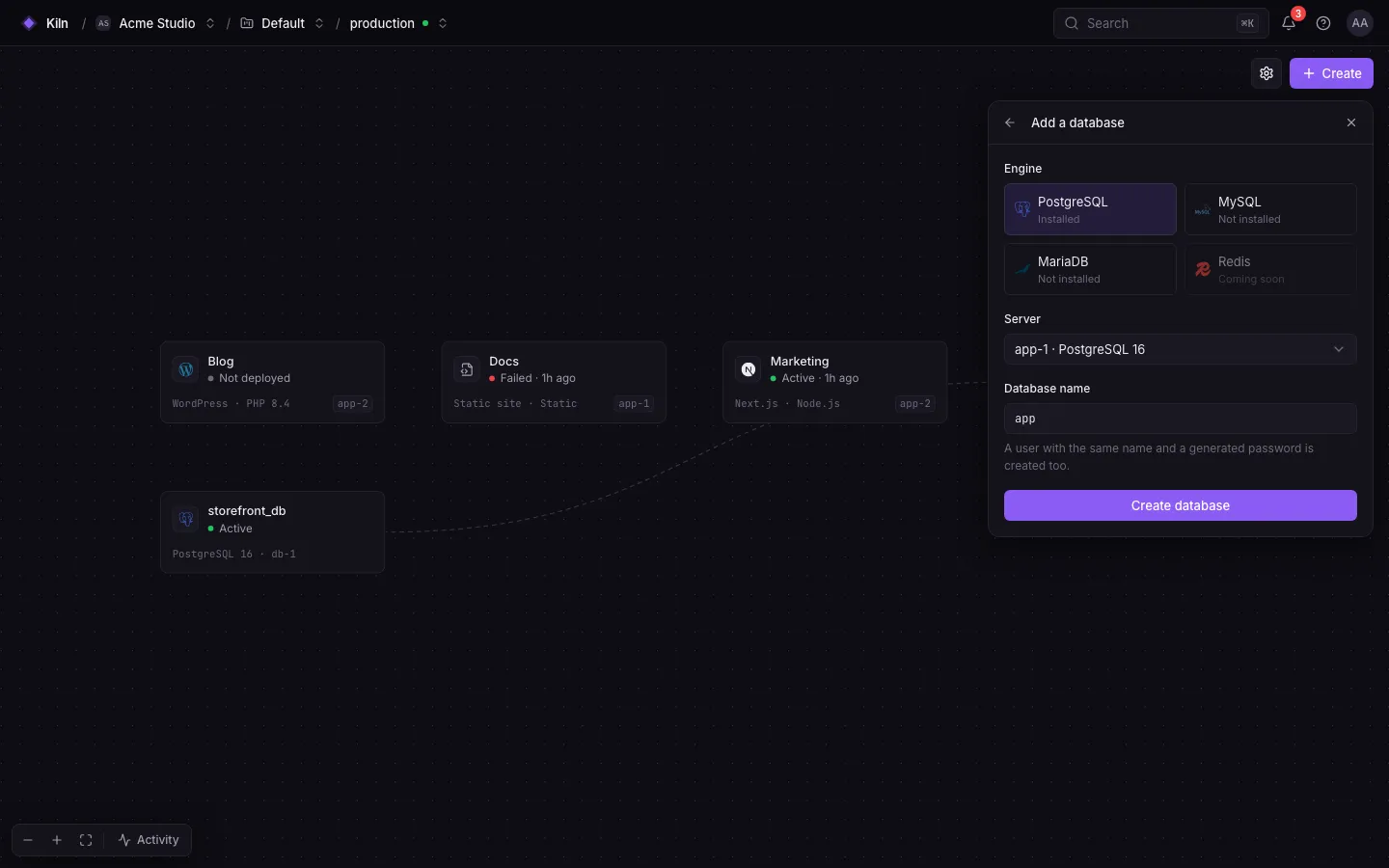
| Field | Rule |
|---|---|
| Name | Up to 63 characters |
| Charset / collation | Optional; defaults utf8mb4_0900_ai_ci (MySQL), utf8mb4_unicode_ci (MariaDB); PostgreSQL uses the server default |
| User | Optional: username (up to 63), password (12–128 characters, generated with 32 characters when empty), host (MySQL/MariaDB, default %) |
The database panel
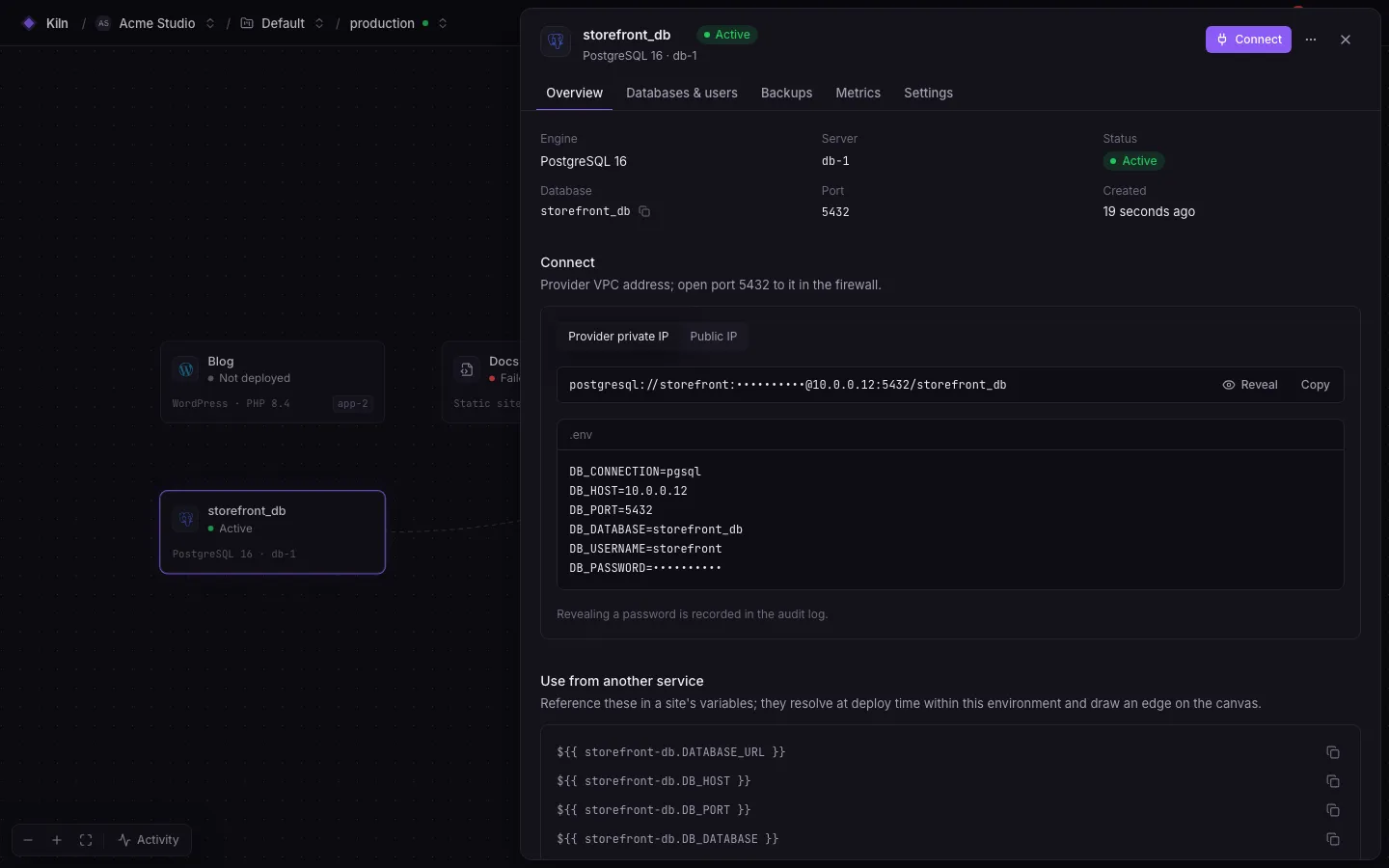
Section titled “The database panel”| Tab | Contents |
|---|---|
| Overview | Engine, server, connection string with copy and reveal, private-network address |
| Databases & users | Databases on the engine, users and their grants |
| Backups | Schedules, history, restore |
| Settings | Engine version and port, danger zone |
Users and grants
Section titled “Users and grants”- Panel → Databases & users → New user.
- Enter a username and optional password (generated when empty) and, for MySQL/MariaDB, the host (
%for any,localhostfor local only). - Grant access per database. Privileges are upper-case names such as
ALL PRIVILEGES,SELECT,INSERT.
Rotate a password from the user’s menu. Revealing a password needs databases.credentials.reveal (owners, admins, developers).
Connect a site
Section titled “Connect a site”Reference the database from the site’s variables:
DATABASE_URL=${{ shop-db.DATABASE_URL }}The keys are DATABASE_URL, DB_CONNECTION, DB_HOST, DB_PORT, DB_DATABASE, DB_USERNAME, DB_PASSWORD. The username and password are those of the oldest user granted on the database (users with ALL PRIVILEGES first). See Variable references.
Containers and databases on the same server
Section titled “Containers and databases on the same server”An engine on an app or worker server serves that server only. Its references resolve for a site running on that server alone:
| Consumer on the same server | DB_HOST |
|---|---|
| Native site (Laravel, Node.js, …) | 127.0.0.1 |
| Container: Docker site, Compose stack, function | The server’s own address (private network → provider private IP → public IP), reached through the Docker bridge |
For containers, the engine accepts connections from Docker’s address ranges (FALAK_DOCKER_NETWORKS, default 172.16.0.0/12,192.168.0.0/16: PostgreSQL host rules, an extra MySQL/MariaDB account per range), and the server firewall opens the database port on the Docker bridges only (docker0, br-*). Only Docker networks get in; the port stays closed to the network. This needs agent 0.4.5 or newer: it turns on per engine once the agent reports it. Until then the reference fails the deploy and says to update the server’s agent.
Delete
Section titled “Delete”Deleting a database asks you to type its name. It drops the database on the server.
Permissions
Section titled “Permissions”| Action | Permission | Roles |
|---|---|---|
| View | databases.view |
all |
| Create/drop databases and users, backups | databases.manage |
owner, admin, developer |
| Reveal passwords | databases.credentials.reveal |
owner, admin, developer |
| Restore backups | databases.restore |
owner, admin |
| Backup storage credentials | databases.storage.manage |
owner, admin |