Multiple servers and load balancers
A site can run on up to 50 servers. Falak builds once, deploys to all of them together, runs migrations on the leader only, and can put a load balancer in front.
Add servers to a site
Section titled “Add servers to a site”- Open the site’s Settings → Servers.
- Add servers of type app, web or worker. Pick the leader.
- New servers are prepared (site user, PHP-FPM pool, runtimes) and get a release on the next deployment. Deploy.
Until the next deployment, a newly added server has no release and runs none of the site’s processes.
The leader
Section titled “The leader”The leader runs things that must happen once:
- the pre-activation part of the deploy script as the migrate phase (wrap migrations in
if [ "$FALAK_IS_LEADER" = "1" ]); - the Laravel scheduler;
- Compose
falak.deploy.leader_commands.
Generated domains also point at the leader unless the site has a load balancer. If the leader fails to prepare during a deployment, the deployment fails.
Put a load balancer in front
Section titled “Put a load balancer in front”Without a load balancer, you can point DNS at every server (an A record per server, DNS round-robin). A load balancer gives you one address, health-based routing and one place for TLS.
- Create a server of type Load balancer (
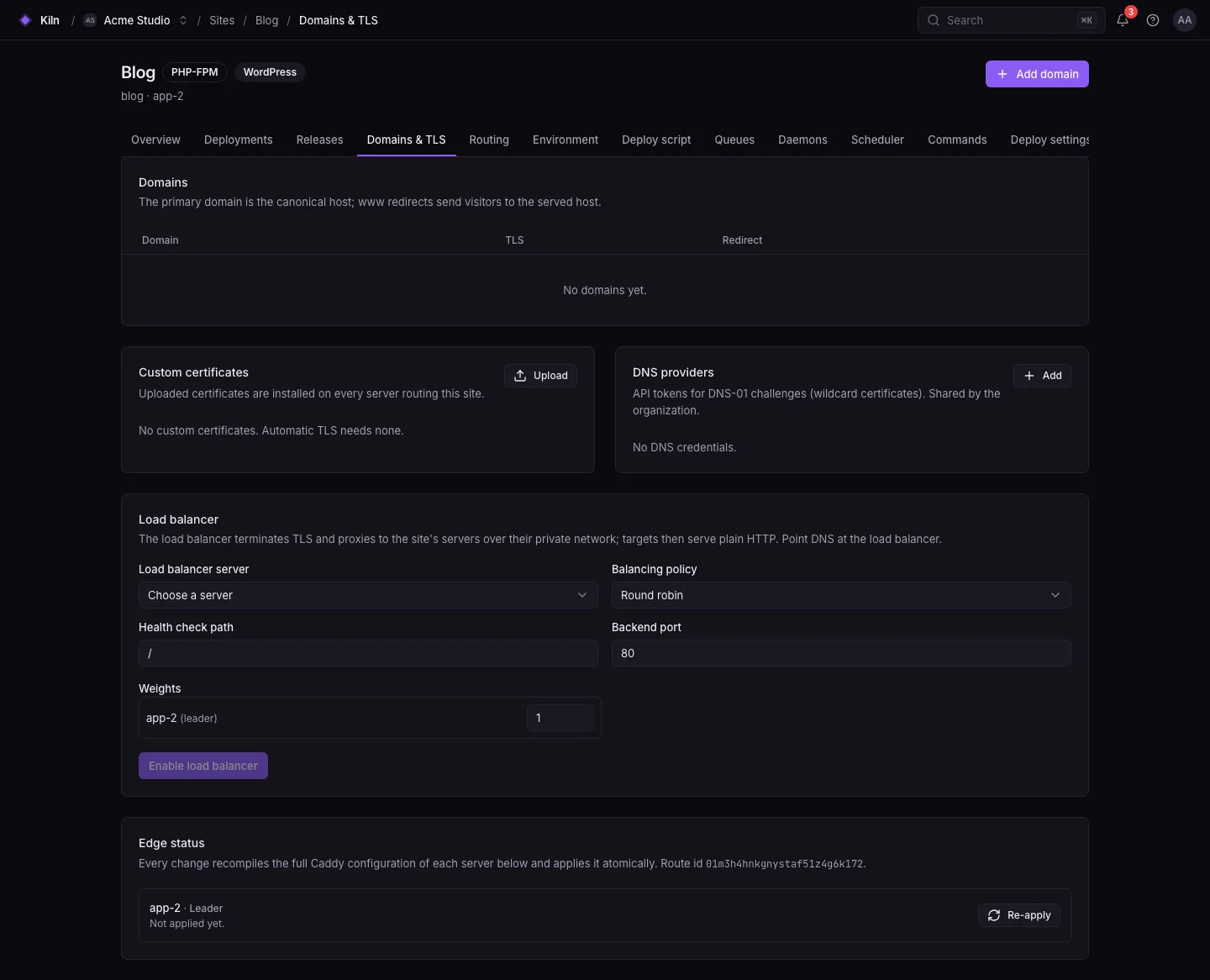
lb). It gets a standalone Caddy. - Open the site’s Settings → Networking (Load balancer section).
- Choose the load balancer server, the policy, an optional health check path, the backend port (default
80) and per-server weights (1–10). - Click Enable load balancer.
- Point your domain’s DNS at the load balancer’s IP. The DNS check shows the load balancer as the only target.
Policies
Section titled “Policies”| Policy | Value | Behaviour |
|---|---|---|
| Round robin | round_robin |
Requests go to each backend in turn (default) |
| Least connections | least_conn |
To the backend with the fewest active connections |
| First available | first |
Always the first healthy backend; the rest are failover |
| IP hash | ip_hash |
The same client IP goes to the same backend (sticky) |
How traffic flows
Section titled “How traffic flows”client ──HTTPS──► load balancer (Caddy, TLS, access log) ├─ HTTP ──► app-1 (private network) └─ HTTP ──► app-2The load balancer terminates TLS and proxies to the site’s servers over their private network; the backends serve plain HTTP. Access logs for the site are written on the load balancer.
Scale workers separately
Section titled “Scale workers separately”Use worker servers for queue workers, daemons and cron without web traffic. In the Processes tab, choose which servers run each worker or daemon (default: all the site’s servers).
Limits
Section titled “Limits”- Load balancer active health checks send the backend’s IP as the
Hostheader, so backends whose routes only match domain names can be marked down. Leave the health check path empty to balance without active checks. - Weights are emulated by repeating a backend in the upstream list.
- Load balancers are covered by unit and feature tests, not yet by the end-to-end suite.
- Shared paths (
storage/, uploads) are per server. Use object storage (S3) for user uploads when you run more than one server.